第24章 ページネーションと無限スクロール
この章のねらい
タスクが増えると、一覧を一度に全部出すわけにはいきません。この章では、件数の多い一覧を分割して見せる方法を、3 段階で学びます。
通常のページネーション、「もっと読む」ボタンによる追加読み込み、そして無限スクロールです。それぞれに向き不向きがあり、どの Hotwire の道具を使うかも変わります。
24.1 完成イメージ
- ページ送り …
?page=2のようにページを切り替える、いちばん基本的な形 - もっと読む … ボタンを押すと、続きが一覧の末尾に追加される形
- 無限スクロール … 一覧の末尾までスクロールすると、自動で続きが読み込まれる形
下に行くほど「途切れず読める」一方で、操作性やアクセシビリティの注意が増えます。
24.2 この章の選択
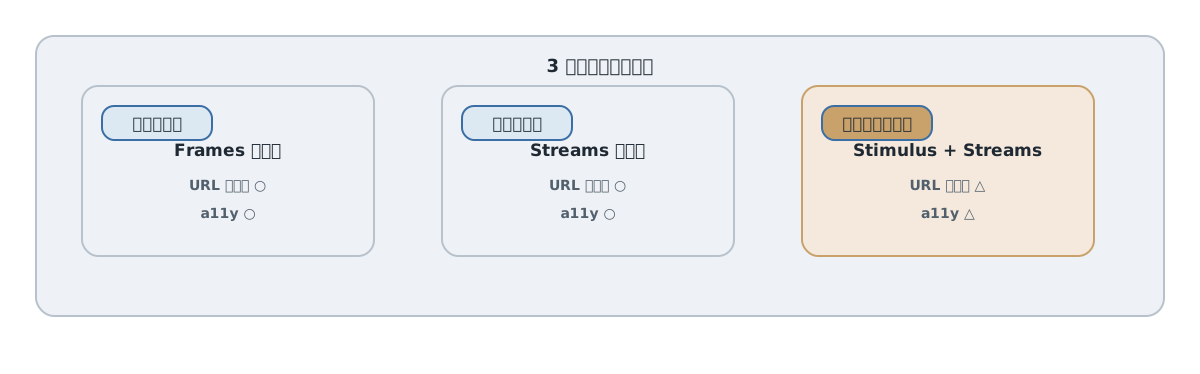
3 段階で、使う道具が変わります。
- ページ送りは、一覧を別ページの内容で置換します。Turbo Frames が向きます。
- もっと読むは、続きを末尾に追記します。Turbo Streams の
appendが向きます。 - 無限スクロールは、「末尾が見えた」ことを検知して、もっと読むを自動で押します。検知は Stimulus が担います。
置換は Frames、追記は Streams、検知は Stimulus。第7部の判断軸が、ここでも効きます。
24.3 通常のページネーションを作る
まず、サーバー側でページごとに区切ります。ここでは仕組みを示すため手で書きますが、実務では Pagy や Kaminari などの gem を使うのが普通です。
app/controllers/tasks_controller.rb(index。PER_PAGE はコントローラのクラス定数として定義しておきます)
PER_PAGE = 20

def index
  @page = [params[:page].to_i, 1].max
  @task = Task.new
  scope = filtered_tasks
  @total_count = scope.count
  @tasks = scope.offset((@page - 1) * PER_PAGE).limit(PER_PAGE)
  @next_page = @page + 1 if scope.count > @page * PER_PAGE
end
@next_page は、次のページがあるときだけ値が入ります。最終ページでは nil です。
ビューでは、一覧と「次へ」のリンクを出します。
<div id="tasks">
  <%= render @tasks %>
</div>

<% if @next_page %>
  <%= link_to "次へ", tasks_path(request.query_parameters.merge(page: @next_page)) %>
<% end %>
この時点では、ページを切り替えるとページ全体が visit されます。
24.4 Frame 内ページネーションと data-turbo-action
一覧とページ送りだけを差し替えるために、frame で囲みます。第23章の検索と同じ考え方です。
<%= turbo_frame_tag "task_list", data: { turbo_action: "advance" } do %>
  <div id="tasks">
    <%= render @tasks %>
  </div>

  <% if @next_page %>
    <%= link_to "次へ", tasks_path(request.query_parameters.merge(page: @next_page)) %>
  <% end %>
<% end %>
ページ送りのリンクは frame の中にあるので、クリックすると task_list frame だけが次ページの内容に置き換わります。data-turbo-action="advance" を付けてあるので、URL も ?page=2 に変わり、リロードや共有、戻る操作に耐えます。
これが「置換」型のページネーションです。一覧をまるごと次ページに置き換えます。
24.5 「もっと読む」ボタンで append を使う
次は「追記」型です。ページを置き換えるのではなく、続きを末尾に足します。
「もっと読む」リンクを、Turbo Streams で応答させます。第15章で見たとおり、GET でも data-turbo-stream を付ければ Turbo Streams を受け取れます。
<div id="tasks">
  <%= render @tasks %>
</div>

<div id="pagination">
  <% if @next_page %>
    <%= link_to "もっと読む", tasks_path(request.query_parameters.merge(page: @next_page)), data: { turbo_stream: true, infinite_scroll_target: "button" } %>
  <% end %>
</div>
コントローラは、turbo_stream 形式に応答します。
app/controllers/tasks_controller.rb(index に追記)
respond_to do |format|
  format.html
  format.turbo_stream
end
app/views/tasks/index.turbo_stream.erb
<%= turbo_stream.append "tasks", partial: "tasks/task", collection: @tasks %>
<%= turbo_stream.update "pagination" do %>
  <% if @next_page %>
    <%= link_to "もっと読む", tasks_path(request.query_parameters.merge(page: @next_page)), data: { turbo_stream: true, infinite_scroll_target: "button" } %>
  <% end %>
<% end %>
「もっと読む」を押すと、次ページのタスクが id="tasks" の末尾に append され、ボタン自体は次ページ用のボタンに update されます。最終ページでは @next_page が nil なので、ボタンが消えます。一覧は置き換わらず、下に伸びていきます。
24.6 IntersectionObserver で自動化する
無限スクロールは、この「もっと読む」を自動で押す形です。末尾が画面に見えたことを検知して、ボタンをクリックします。検知には、ブラウザの IntersectionObserver を使います。これを Stimulus コントローラで包みます。
app/javascript/controllers/infinite_scroll_controller.js
app/javascript/controllers/infinite_scroll_controller.js
import { Controller } from "@hotwired/stimulus"
export default class extends Controller {
  static targets = ["button"]
  initialize() {
    this.observer = new IntersectionObserver((entries) => {
      for (const entry of entries) {
        if (entry.isIntersecting && entry.target.isConnected) {
          // 同じリンクの自動送信は一度だけ。失敗時は手動で再試行できる。
          this.observer.unobserve(entry.target)
          entry.target.click()
        }
      }
    })
  }
  buttonTargetConnected(button) { this.observer.observe(button) }
  buttonTargetDisconnected(button) { this.observer.unobserve(button) }
  disconnect() { this.observer.disconnect() }
}
buttonTargetConnected は初回の connect より先に呼ばれます。そのため observer は initialize で作ります。新旧のリンクを同じ partial から描き、更新後にも target 属性を残します。
ここがこの章の肝です。「もっと読む」を押すと、24.5 のとおり update "pagination" でボタンが新しい要素に差し替わります。もし connect() で最初のボタンだけを監視していると、差し替え後は削除済みの旧ボタンを見続け、2 回目以降が発火しません。そこで、ターゲットが差し替わるたびに呼ばれる buttonTargetConnected / buttonTargetDisconnected を使い、新しいボタンを監視し直します。最終ページでボタンが消えれば、buttonTargetDisconnected で監視が外れ、自動読み込みも止まります。
<div id="pagination" data-controller="infinite-scroll">
  <% if @next_page %>
    <%= link_to "もっと読む", tasks_path(request.query_parameters.merge(page: @next_page)),
          data: { turbo_stream: true, infinite_scroll_target: "button" } %>
  <% end %>
</div>
ここで data-controller の値に注意します。ファイル名は infinite_scroll_controller.js ですが、識別子はアンダースコアがハイフンになり infinite-scroll です(第19章)。data-controller の値は変換されないので、"infinite-scroll" と書きます。一方、ターゲットの data: { infinite_scroll_target: "button" } は、Rails が属性名を data-infinite-scroll-target に変換するので、そのままで infinite-scroll コントローラのターゲットになります。
「もっと読む」ボタンが画面に見えると、IntersectionObserver が検知し、ボタンを click() します。クリックは 24.5 の append を起こすので、続きが自動で読み込まれます。disconnect() で監視を解除するのを忘れないでください(第22章)。
24.7 ボタンを残す理由
無限スクロールでも、24.6 のように「もっと読む」ボタンを土台に残すことを勧めます。自動読み込みは、その上に乗せる「おまけ」と考えます。
理由はアクセシビリティです。純粋な無限スクロールは、キーボードだけで操作するユーザーや、スクリーンリーダーのユーザーには扱いにくいものです。ボタンがあれば、スクロールに頼らず続きを読めますし、フォーカスも当てられます。自動読み込みは便利ですが、ボタンという確実な手段を奪ってはいけません。
24.8 URL とスクロール位置
追記型・無限スクロールには、URL とスクロール位置の弱点があります。
ページ送り(24.4)は ?page=2 が URL に残るので、リロードや共有で同じ位置に戻れます。一方、もっと読む・無限スクロールは、下に伸ばしているだけなので、リロードすると最初のページに戻ります。また、詳細へ移動してから戻ると、読み込んだ続きやスクロール位置が失われがちです。
「途切れず読める」ことと「URL で位置を再現できる」ことは、トレードオフです。共有・リロードを重視する一覧はページ送りに、流し読みを重視する一覧は追記型に、と使い分けます。
24.9 テスト
ページネーションのテストでは、次の 2 点を特に確かめます。
- 追記に重複がないこと。「もっと読む」を押したとき、すでに表示済みのタスクが二重に出ないか。
- 最終ページの終端。最後まで読み込んだら、「もっと読む」が消えるか。
System Test で、もっと読むを押して件数が増えること、最後にボタンが消えることを確認します。境界(ちょうど割り切れる件数、1 ページに満たない件数)も見ておくと安心です。
24.10 アンチパターン
- フッターに永遠に到達できない。無限スクロールで、ページ下部のフッターやリンクに、いつまでもたどり着けなくなる。
- 戻ると位置が失われる。詳細から戻ったとき、読み込んだ続きやスクロール位置が消える。
- 監視の解除漏れ。
IntersectionObserverをdisconnect()で解除せず、二重に読み込む。
第24章では、ページネーションを置換・追記・検知の 3 段階で作り分けました。次の第25章では、フォームのバリデーションエラーと、その UX を扱います。第8章で予告した 422 の契約を、ここで本格的に使います。
24.11 完成版への置き換え
ここまでのページ送り・追記型・自動読み込みは、同じ場所へ重ねて追加するコードではなく、表示方式の選択肢です。完成版では mode=pages / more / infinite で切り替えます。以下は第23章の検索、CRUD、モーダルの分岐も含む統合版です。第25・26章ではフォームとモーダル側を読み解きます。
app/controllers/tasks_controller.rb
class TasksController < ApplicationController
  before_action :set_task, only: %i[show edit update destroy]
  PER_PAGE = 20

  def index
    @task = Task.new
    scope = filtered_tasks
    @total_count = scope.count
    @page = [ params[:page].to_i, 1 ].max
    @paged_tasks = scope.offset((@page - 1) * PER_PAGE).limit(PER_PAGE)
    @next_page = @page + 1 if @total_count > @page * PER_PAGE
    @mode = %w[more infinite].include?(params[:mode]) ? params[:mode] : "pages"
    respond_to do |format|
      format.html
      format.turbo_stream do
        if @mode != "pages" && params[:page].present?
          render :index
        else
          render :index, formats: [ :html ], content_type: "text/html"
        end
      end
    end
  end

  def show
    @comment = Comment.new
  end

  def new
    @task = Task.new
  end

  def edit
  end

  def create
    @task = Task.new(task_params)
    if @task.save
      respond_to do |format|
        format.turbo_stream { flash.now[:notice] = "タスクを作成しました。" }
        format.html { redirect_to @task, notice: "タスクを作成しました。", status: :see_other }
      end
    elsif turbo_frame_request_id == "modal"
      render :new, formats: [ :html ], status: :unprocessable_entity
    elsif params[:form_context] == "inline" && request.format.turbo_stream?
      render turbo_stream: turbo_stream.update("new_task_form", partial: "tasks/form",
        locals: { task: @task, context: "inline" }), status: :unprocessable_entity
    else
      render :new, formats: [ :html ], status: :unprocessable_entity
    end
  end

  def update
    if @task.update(task_params)
      respond_to do |format|
        format.turbo_stream { flash.now[:notice] = "タスクを更新しました。" }
        format.html { redirect_to @task, notice: "タスクを更新しました。", status: :see_other }
      end
    else
      render :edit, formats: [ :html ], status: :unprocessable_entity
    end
  end

  def destroy
    @task.destroy!
    respond_to do |format|
      format.turbo_stream { flash.now[:notice] = "タスクを削除しました。" }
      format.html { redirect_to tasks_path, notice: "タスクを削除しました。", status: :see_other }
    end
  end

  private

  def set_task
    @task = Task.find(params[:id])
  end

  def task_params
    params.expect(task: [ :project_id, :title, :description, :status, :due_on, :assignee_id, tag_ids: [] ])
  end

  def filtered_tasks
    scope = Task.includes(:assignee, :tags).order(id: :desc)
    if params[:q].present?
      scope = scope.where("title LIKE ? ESCAPE ?", "%#{Task.sanitize_sql_like(params[:q])}%", "\\")
    end
    scope = scope.where(status: params[:status]) if params[:status].present?
    scope = scope.where(project_id: params[:project_id]) if params[:project_id].present?
    scope = scope.joins(:taggings).where(taggings: { tag_id: params[:tag_id] }).distinct if params[:tag_id].present?
    scope
  end
end
app/views/tasks/index.html.erb
<% content_for :title, "タスク" %>
<h1>タスク</h1>
<%= turbo_stream_from :tasks %>
<div id="task_changes"></div>
<p><%= link_to "新規作成(モーダル)", new_task_path, id: "new_task_modal_link", data: { turbo_frame: "modal" } %></p>
<section class="new-task">
  <h2>新規タスク</h2>
  <div id="new_task_form"><%= render "form", task: @task, context: "inline" %></div>
</section>
<%= form_with url: tasks_path, method: :get,
  data: { turbo_frame: "task_list", turbo_action: "replace", controller: "search",
    action: "input->search#submit change->search#submit compositionstart->search#startComposition compositionend->search#endComposition" } do |form| %>
  <%= form.label :q, "タイトルで検索" %>
  <%= form.search_field :q, value: params[:q] %>
  <%= form.label :status, "ステータス" %>
  <%= form.select :status, Task.statuses.keys, { include_blank: "すべて", selected: params[:status] } %>
  <%= form.label :project_id, "プロジェクト" %>
  <%= form.collection_select :project_id, Project.order(:name), :id, :name, { include_blank: "すべて", selected: params[:project_id] } %>
  <%= form.label :tag_id, "タグ" %>
  <%= form.collection_select :tag_id, Tag.order(:name), :id, :name, { include_blank: "すべて", selected: params[:tag_id] } %>
  <%= form.hidden_field :mode, value: @mode %>
  <%= form.submit "検索" %>
<% end %>
<nav aria-label="一覧の表示方式">
  <% { "pages" => "ページ送り", "more" => "もっと読む", "infinite" => "自動読み込み" }.each do |mode, label| %>
    <%= link_to label, tasks_path(request.query_parameters.except("page").merge(mode: mode)) %>
  <% end %>
</nav>
<section data-controller="task-list" data-mode="<%= @mode %>" data-action="tasks:received@document->task-list#changed turbo:frame-load->task-list#loaded">
  <p hidden data-task-list-target="notice" role="status">更新があります。編集中の内容を保存してから
    <button type="button" data-action="task-list#refresh">最新の一覧を表示</button>してください。追記型は先頭から表示します。
  </p>
  <%= turbo_frame_tag "task_list", data: { turbo_action: "advance", task_list_target: "frame" } do %>
    <p role="status" data-task-list-target="location" data-url="<%= request.fullpath %>"><span id="task_count"><%= @total_count %></span> 件該当(現在 <%= @page %> ページ)</p>
    <%= render "tasks", tasks: @paged_tasks %>
    <% if @mode == "pages" %>
      <nav aria-label="ページ送り">
        <%= link_to "前へ", tasks_path(request.query_parameters.merge(page: @page - 1)) if @page > 1 %>
        <%= link_to "次へ", tasks_path(request.query_parameters.merge(page: @next_page)) if @next_page %>
      </nav>
    <% else %>
      <div id="pagination" data-controller="<%= "infinite-scroll" if @mode == "infinite" %>">
        <%= render "pagination" %>
      </div>
    <% end %>
  <% end %>
</section>
app/views/tasks/_pagination.html.erb
<% if @next_page %>
  <%= link_to "もっと読む", tasks_path(request.query_parameters.merge(page: @next_page)),
    data: { turbo_stream: true, infinite_scroll_target: "button" } %>
<% end %>
app/views/tasks/index.turbo_stream.erb
<%= turbo_stream.append "tasks", partial: "tasks/task", collection: @paged_tasks %>
<%= turbo_stream.update "pagination", partial: "tasks/pagination" %>
app/views/tasks/create.turbo_stream.erb
<%= turbo_stream.update "new_task_form" do %>
  <%= render "form", task: Task.new, context: "inline" %>
<% end %>
<%= turbo_stream.update "modal" %>
<%= turbo_stream.update "flash", partial: "layouts/flash" %>
<%= turbo_stream.update "task_changes", partial: "tasks/change" %>
app/views/tasks/update.turbo_stream.erb
<%= turbo_stream.replace @task %>
<%= turbo_stream.update "flash", partial: "layouts/flash" %>
<%= turbo_stream.update "task_changes", partial: "tasks/change" %>
app/views/tasks/destroy.turbo_stream.erb
<%= turbo_stream.remove @task %>
<%= turbo_stream.update "flash", partial: "layouts/flash" %>
<%= turbo_stream.update "task_changes", partial: "tasks/change" %>
@total_count は全該当件数、@paged_tasks は現在のページの行です。変更通知後は一覧フレームを再取得し、件数・空状態・次ページの有無を同じ条件で再計算します。編集中と追記モードでは自動で全置換せず通知を出します。
offset 型は読み込みの途中でレコードが増減するとページ境界が動きます。静止したデータでの重複防止テストと、同時更新時の順序保証は別です。本番で厳密な連続性が必要ならカーソル型を検討します。
参考資料
- Turbo Frames(Handbook): https://turbo.hotwired.dev/handbook/frames
- Turbo Streams リファレンス: https://turbo.hotwired.dev/reference/streams
- Stimulus(Building Something Real): https://stimulus.hotwired.dev/handbook/building-something-real
- MDN: IntersectionObserver: https://developer.mozilla.org/en-US/docs/Web/API/Intersection_Observer_API