第16章 create / update / destroy を Stream 化する
この章のねらい
第15章で、Turbo Streams は「差し替え命令の入った HTML」だと学びました。この章では、それを Relay の CRUD に組み込みます。タスクの作成・更新・削除を、ページ遷移なしで反映します。
第15章で断片として示した respond_to の完全形(成功は stream、失敗は 422)を、ここで仕上げます。第8章の契約(成功は redirect か stream、失敗は 422)が、Streams でもそのまま効きます。
この章では、一覧画面が次の構造になっている前提で進めます。
app/views/tasks/index.html.erb(抜粋)
<%# flash は第5章でレイアウトに設置済みです。ここへ重ねて置きません。 %>

<div id="new_task_form">
  <%= render "form", task: @task, context: "inline" %>
</div>

<div id="tasks">
  <%= render @tasks %>
</div>
id="tasks" がタスク一覧の入れ物、id="new_task_form" が新規作成フォームの入れ物、レイアウトの id="flash" がフラッシュの入れ物です。各タスクは、第12章の _task(id="task_1" の frame)で描かれます。index アクションでは、一覧用の @tasks と、新規フォーム用の @task = Task.new を用意しておきます。
なお本書は、Turbo が有効な前提で進めます。各アクションには通常の HTML を返す format.html も書きますが、これは Turbo が使えないクライアント向けのフォールバックです。Turbo 経路と HTML 経路で挙動が食い違わないよう、フラッシュの渡し方や失敗時の戻し先を、経路ごとに揃えておきます。
16.1 create 後に prepend する
タスクを作成したら、一覧の先頭に追加します。create アクションを Turbo Streams に対応させます。
app/controllers/tasks_controller.rb(create の成功側)
if @task.save
  respond_to do |format|
    format.turbo_stream
    format.html { redirect_to @task }
  end
end
create.turbo_stream.erb で、命令を組み立てます。
app/views/tasks/create.turbo_stream.erb
<%= turbo_stream.prepend "tasks", @task %>
<%= turbo_stream.update "new_task_form" do %>
  <%= render "form", task: Task.new, context: "inline" %>
<% end %>
1 つ目の命令は、id="tasks" の先頭に、作成したタスク(_task)を prepend します。2 つ目の命令は、id="new_task_form" の中身を、新しい空のフォームに update します。これで、フォームを送信すると、一覧の先頭に新しいタスクが現れ、フォームが空に戻ります。ページ遷移は起きません。
ここで第15章のポイントが効いています。1 つのレスポンスに 2 つの命令を入れて、一覧とフォームという離れた 2 か所を同時に更新しています。
16.2 update 後に replace する
タスクを更新したら、その行だけを新しい内容に差し替えます。update アクションの成功側を Turbo Streams に対応させ、update.turbo_stream.erb を用意します。
app/views/tasks/update.turbo_stream.erb
<%= turbo_stream.replace @task %>
turbo_stream.replace @task は、@task の dom_id(task_1)を target に、_task を描いて要素ごと差し替えます。第12章で、表示も編集も id="task_1" の frame に揃えていたので、その frame がまるごと新しい表示に置き換わります。
replace と update の違い(第15章)を思い出してください。ここでは行(frame)の要素ごと差し替えたいので replace です。
16.3 destroy 後に remove する
タスクを削除したら、その行を消します。destroy.turbo_stream.erb を用意します。
app/views/tasks/destroy.turbo_stream.erb
<%= turbo_stream.remove @task %>
turbo_stream.remove @task は、@task の dom_id(task_1)の要素を削除します。remove は要素を消すだけなので、中身の HTML は要りません(第15章)。
16.4 flash を更新する
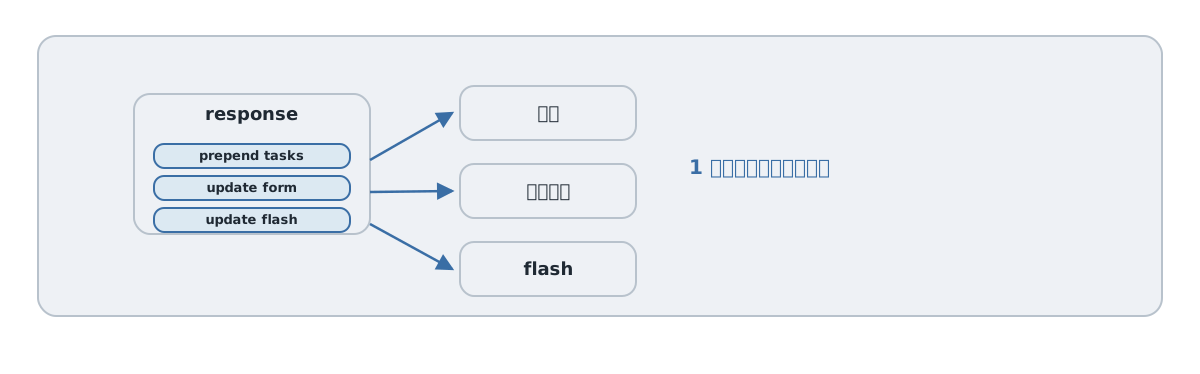
操作の結果を、フラッシュで知らせたいこともあります。一覧の入れ物に id="flash" を用意してあるので、ここを更新する命令を足します。
まず、コントローラでフラッシュを設定します。ここで注意が要ります。Turbo Streams の応答ではページ遷移しないので flash.now を使いますが、HTML フォールバックは redirect_to で遷移するので、リダイレクト後まで残る flash を使う必要があります。flash.now はそのリクエスト限りで消えるため、リダイレクトでは残りません。そこで、経路ごとに分けて設定します。
app/controllers/tasks_controller.rb(create の成功側)
if @task.save
  respond_to do |format|
    format.turbo_stream do
      flash.now[:notice] = "タスクを作成しました。"
      render :create
    end
    format.html { redirect_to @task, notice: "タスクを作成しました。" }
  end
end
format.turbo_stream の側では flash.now を立ててから create.turbo_stream.erb を描き(その中で flash を更新します)、format.html の側では redirect_to の notice: でリダイレクト後に残るフラッシュを渡します。
そして、create.turbo_stream.erb に flash を更新する命令を足します。
app/views/tasks/create.turbo_stream.erb(追記)
<%= turbo_stream.update "flash", partial: "layouts/flash" %>
これで、作成時に「一覧へ prepend」「フォームを空に update」「flash を update」という 3 つの命令が、1 レスポンスで送られます。第14章で frame では応えられなかった「複数箇所の同時更新」が、これで実現できました。
16.5 送信元に応じてエラーを戻す
一覧内フォームと /tasks/new の独立したページでは、差し替え先が違います。フォームの先頭に次を加え、一覧からは context: "inline" を渡します。単独ページでは HTML の成功リダイレクトを使うため、フォーム送信の Turbo を無効にしています。ページのリンク遷移まで無効にする設定ではありません。
<% context = local_assigns.fetch(:context, "page") %>
<%= form_with model: task, data: { turbo: context != "page" } do |form| %>
  <%= hidden_field_tag :form_context, context %>
  <%# 既存の入力欄と保存ボタンをここへ残す %>
<% end %>
編集フレームの render "form" には context: "edit" を渡します。以下で、既存の create / update / destroy を置き換えます。set_task と task_params は scaffold のまま残します。
def create
  @task = Task.new(task_params)
  if @task.save
    respond_to do |format|
      format.turbo_stream { flash.now[:notice] = "タスクを作成しました。" }
      format.html { redirect_to @task, notice: "タスクを作成しました。", status: :see_other }
    end
  elsif params[:form_context] == "inline" && request.format.turbo_stream?
    render turbo_stream: turbo_stream.update("new_task_form", partial: "tasks/form",
      locals: { task: @task, context: "inline" }), status: :unprocessable_entity
  else
    render :new, formats: [:html], status: :unprocessable_entity
  end
end

def update
  if @task.update(task_params)
    respond_to do |format|
      format.turbo_stream { flash.now[:notice] = "タスクを更新しました。" }
      format.html { redirect_to @task, notice: "タスクを更新しました。", status: :see_other }
    end
  else
    render :edit, formats: [:html], status: :unprocessable_entity
  end
end

def destroy
  @task.destroy!
  respond_to do |format|
    format.turbo_stream { flash.now[:notice] = "タスクを削除しました。" }
    format.html { redirect_to tasks_path, notice: "タスクを削除しました。", status: :see_other }
  end
end
update と destroy の stream テンプレートにも turbo_stream.update "flash", partial: "layouts/flash" を追加します。作成の成功時に単に stream を返すだけでは、単独の new ページに #tasks がないので表示は更新されません。HTML 経路はこの違いを扱うために必要です。
16.6 この章の System Test
作成(成功・失敗)と削除を、System Test で確認します。
test/system/tasks_stream_test.rb
require "application_system_test_case"

class TasksStreamTest < ApplicationSystemTestCase
  setup do
    @project = Project.create!(name: "テスト用プロジェクト")
  end

  test "作成すると一覧の先頭に追加される" do
    visit tasks_path
    fill_in "タイトル", with: "新しいタスク"
    select @project.name, from: "プロジェクト"
    click_on "保存"

    within "#tasks" do
      assert_text "新しいタスク"
    end
  end

  test "タイトルが空だとフォームにエラーが出る" do
    visit tasks_path
    fill_in "タイトル", with: ""
    select @project.name, from: "プロジェクト"
    click_on "保存"

    within "#new_task_form" do
      assert_selector "input[name='task[title]']"
      assert_selector "[role=alert]"
    end
  end

  test "削除すると一覧から消える" do
    task = @project.tasks.create!(title: "消されるタスク")
    visit tasks_path

    within "##{dom_id(task)}" do
      accept_confirm { click_on "削除" }
    end

    assert_no_text "消されるタスク"
  end
end
このテストは表示内容を確認します。HTTP 422 はリクエストテストで検証します。フルリロードがないことや先頭への追加まで保証するには、第28章の完成版テストのように JavaScript の印と先頭要素を追加で検証します。作成成功は #tasks の中に出ること、失敗は #new_task_form の中にエラーが出ること、削除は一覧から消えることを、それぞれ見ています。
第16章では、CRUD を Turbo Streams で動かし、作成時に複数箇所を同時更新できることを見ました。次の第17章では、その「複数箇所の同時更新」を、件数・空状態・partial 共通化・id 設計の観点で深めます。
16.7 コメントの UI を追加する
config/routes.rb の resources :tasks に resources :comments, only: %i[create destroy], module: :tasks をネストします。TasksController#show に @comment = Comment.new を追加します。
app/controllers/tasks/comments_controller.rb
# 第16章: コメントの追加・削除を Turbo Streams で
class Tasks::CommentsController < ApplicationController
  before_action :set_task

  def create
    @comment = @task.comments.build(comment_params.merge(user: Current.user))
    if @comment.save
      respond_to do |format|
        format.turbo_stream
        format.html { redirect_to @task }
      end
    else
      respond_to do |format|
        format.turbo_stream do
          render turbo_stream: turbo_stream.update(helpers.dom_id(@task, :comment_form),
            partial: "comments/form", locals: { task: @task, comment: @comment }), status: :unprocessable_entity
        end
        format.html { render "tasks/show", status: :unprocessable_entity }
      end
    end
  end

  def destroy
    @comment = @task.comments.find(params[:id])
    @comment.destroy!
    respond_to do |format|
      format.turbo_stream { render turbo_stream: turbo_stream.remove(@comment) }
      format.html { redirect_to @task }
    end
  end

  private

  def set_task
    @task = Task.find(params[:task_id])
  end

  def comment_params
    params.expect(comment: [ :body ])
  end
end
app/views/comments/_form.html.erb
<%= form_with model: [task, comment] do |form| %>
  <% if comment.errors.any? %>
    <div role="alert" tabindex="-1" data-controller="autofocus"><%= comment.errors.full_messages.to_sentence %></div>
  <% end %>
  <%= form.label :body, "コメント本文" %>
  <%= form.text_area :body %>
  <%= form.submit "コメント", data: { turbo_submits_with: "送信中…" } %>
<% end %>
app/views/comments/_comment.html.erb
<div id="<%= dom_id(comment) %>" class="comment">
  <strong><%= comment.user.name %></strong>
  <span><%= comment.body %></span>
  <%= button_to "削除", task_comment_path(comment.task, comment), method: :delete %>
</div>
app/views/tasks/comments/create.turbo_stream.erb
<%= turbo_stream.append dom_id(@task, :comments), partial: "comments/comment", locals: { comment: @comment } %>
<%= turbo_stream.update dom_id(@task, :comment_form), partial: "comments/form", locals: { task: @task, comment: Comment.new } %>
show.html.erb の render @task の後へ、以下を追加します。
<div id="<%= dom_id(@task, :comments) %>"><%= render @task.comments.includes(:user) %></div>
<div id="<%= dom_id(@task, :comment_form) %>">
  <%= render "comments/form", task: @task, comment: @comment %>
</div>
名前空間付きコントローラなので、stream の partial は "comments/comment" と明記します。投稿者はフォームから受け取らず Current.user で決めます。第18章で、この UI にコメントの購読を追加します。
16.8 この段階のテストと後続章
16.6 のテストは第16章の単一フォームの一覧が対象です。[role=alert] を検証するため、この時点で scaffold のエラー表示コンテナへ role="alert" を加えます。第26章で別のフォームを同時に開けるようになったら、操作を within "#new_task_form" または within "dialog[open]" へ絞ります。完成版のテストは第28章を使います。
参考資料
- Turbo Streams(Handbook): https://turbo.hotwired.dev/handbook/streams
- Turbo Streams リファレンス: https://turbo.hotwired.dev/reference/streams
- Rails ガイド「Action View の概要」: https://guides.rubyonrails.org/action_view_overview.html